All Stories
Showing posts with label T-SQL Statements. Show all posts

Thursday, July 17, 2014


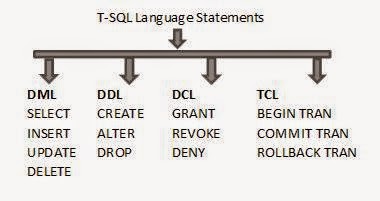
DML Statements:
DML stand for DATA MANIPULATION LANGUAGE. These statements used for querying insert, update, delete and retrieve data in the whole database system.
DML Statements:
Select: Use for retrieve data from table.
Insert: Use for insert new record/data.
Update: Use for update record/data.
Delete: Use for delete record/data or whole table.
DML Statements Implementation:
For the practice of DML first create table.
Create database hnhsol;
Use hnhsol
Create table tb1(id int ,name varchar(20))
insert into tb1 values(1,'salman')
insert into tb1 values(2,'zohaib')
insert into tb1 values(3,'arsalan')
insert into tb1 values(4,'asad')
insert into tb1 values(5,'waqar')

Select Statement:
select * from tb1
(Retrieve all data from a particular table)
select name from tb1
(Here retrieve single column data from a table)

Insert Statement:
insert into tb1 values(6,'ali')
(This statement is use for insert single of data in a table)

Update statement:
update tb1 set name=’naeem’ where id=1;
(This update statement is use for update a particular record in a table)
Note: here where is use for as a search condition or reference that’s why a particular single record change/update otherwise you don’t use this where clause the whole column data will be change, so be care full to use this statement.

Delete Statement:
delete from tb1 where id=2 and name='zohaib';
(This delete statement is use for delete a particular record in a table)

 copy and paste code step by step in sql management studio and see the magic.
 if you have any query related this post . write in comment box. 


T-SQL Statements DML, DDL, DCL,TCL with Example (Part #1).


DML Statements:
DML stand for DATA MANIPULATION LANGUAGE. These statements used for querying insert, update, delete and retrieve data in the whole database system.
DML Statements:
Select: Use for retrieve data from table.
Insert: Use for insert new record/data.
Update: Use for update record/data.
Delete: Use for delete record/data or whole table.
DML Statements Implementation:
For the practice of DML first create table.
Create database hnhsol;
Use hnhsol
Create table tb1(id int ,name varchar(20))
insert into tb1 values(1,'salman')
insert into tb1 values(2,'zohaib')
insert into tb1 values(3,'arsalan')
insert into tb1 values(4,'asad')
insert into tb1 values(5,'waqar')

Select Statement:
select * from tb1
(Retrieve all data from a particular table)
select name from tb1
(Here retrieve single column data from a table)

Insert Statement:
insert into tb1 values(6,'ali')
(This statement is use for insert single of data in a table)

Update statement:
update tb1 set name=’naeem’ where id=1;
(This update statement is use for update a particular record in a table)
Note: here where is use for as a search condition or reference that’s why a particular single record change/update otherwise you don’t use this where clause the whole column data will be change, so be care full to use this statement.

Delete Statement:
delete from tb1 where id=2 and name='zohaib';
(This delete statement is use for delete a particular record in a table)

 copy and paste code step by step in sql management studio and see the magic.
 if you have any query related this post . write in comment box. 


Posted at 10:05 AM |  by Unknown

See me on Linkedin

© 2013 HnH Sol. WP Theme-junkie converted by BloggerTheme9
back to top