All Stories

Sunday, November 8, 2015


Garter Magic Quadrant for Operational Database Management Systems 2015


Posted at 2:43 AM |  by Unknown

Saturday, August 29, 2015

Below is a full list of the Microsoft Dynamics CRM 2015 trainings on our YouTube Channel

Microsoft Dynamics CRM 2015 Product Catalog New Features - What's New
Microsoft Dynamics CRM 2015 Product Catalog New Features – Overview
Microsoft Dynamics CRM 2015 Product Catalog New Features - Setup and Management
Microsoft Dynamics CRM 2015 Product Catalog New Features - Product Properties
Microsoft Dynamics CRM 2015 Product Catalog New Features - Bundles and Kits
Microsoft Dynamics CRM 2015 Product Catalog New Features – Suggestions
Microsoft Dynamics CRM 2015 Product Catalog New Features - Pricing Calculation Configurability
Microsoft Dynamics CRM 2015 Product Catalog New Features - Localizable Attributes
Microsoft Dynamics CRM 2015 Product Catalog New Features - Product Selling
Microsoft Dynamics CRM 2015 Product Catalog New Features – Architecture

Microsoft Dynamics CRM 2015 Enhanced SLA New Features
Microsoft Dynamics CRM 2015 Field Level Security New Features
Microsoft Dynamics CRM 2015 Hierarchy Security Model New Features
Microsoft Dynamics CRM 2015 SLA New Features – Differences

Microsoft Dynamics Marketing 2015 Update Campaign Management New Features – Webinars
Microsoft Dynamics Marketing 2015 Update General New Features – Calendar
Microsoft Dynamics Marketing 2015 Update General New Features – Intro
Microsoft Dynamics Marketing 2015 Update General New Features – Social
Microsoft Dynamics Marketing 2015 Update General New Features – Approvals
Microsoft Dynamics Marketing 2015 Update General New Features – Additional
Microsoft Dynamics Marketing 2015 Update Campaign Management New Features - A/B Test
Microsoft Dynamics Marketing 2015 Update Campaign Management New Features - Workflow Triggers
Microsoft Dynamics Marketing 2015 Update Campaign Management New Features – Offers
Microsoft Dynamics Marketing 2015 Update Microsoft Dynamics CRM Analytics New Features
Microsoft Dynamics Marketing 2015 Update Microsoft Dynamics CRM SDK New Features
Microsoft Dynamics Marketing 2015 Update Sales Collaboration New Features
Microsoft Dynamics Marketing 2015 Update A/B Testing New Features - Overview and Setup
Microsoft Dynamics Marketing 2015 Update A/B Testing New Features - Campaign Automation and Results
Microsoft Dynamics Marketing 2015 Update Microsoft Dynamics CRM Connector New Features

Microsoft Social Listening 2014 R2 New Features
Microsoft Dynamics CRM 2015 Business Rules New Features
Microsoft Dynamics CRM 2015 Business Process Flows New Features
Microsoft Dynamics CRM 2015 Multi-Geo Tenant New Features
Microsoft Dynamics CRM 2015 Setup and Upgrade New Features
Microsoft Dynamics CRM 2015 Search New Features
Microsoft Dynamics CRM 2015 Miscellaneous New Features
Microsoft Dynamics CRM 2015 CRM for Outlook New Features
Microsoft Dynamics CRM 2015 Hierarchy Visualization New Features

Microsoft Dynamics CRM 2015 CRM for Phones New Features
Microsoft Dynamics CRM 2015 CRM for Tablets New Features – Dashboards
Microsoft Dynamics CRM 2015 CRM for Tablets New Features – Iframes
Microsoft Dynamics CRM 2015 CRM for Tablets New Features - Offline Drafts
Microsoft Dynamics CRM 2015 CRM for Tablets New Features - Additional Features

Microsoft Dynamics Marketing 2015 Update Email Editor New Features - Graphical Editor
Microsoft Dynamics Marketing 2015 Update Email Editor New Features – Validation
Microsoft Dynamics Marketing 2015 Update Email Editor New Features -  HTML Editor
Microsoft Dynamics Marketing 2015 Update Lead Management New Features Demo
Microsoft Dynamics Marketing 2015 Update Lead Management New Features - Lists and Contacts
Microsoft Dynamics Marketing 2015 Update Lead Management New Features - Landing Pages and Events
Microsoft Dynamics Marketing 2015 Update Lead Management New Features - Lead Scoring

Microsoft Dynamics CRM 2015 Customization New Features- Power BI
Microsoft Dynamics CRM 2015 Customization New Features - Roll Up Calculated Fields
Microsoft Dynamics CRM 2015 Customization New Features- Customizable Help

Free Microsoft Dynamics CRM 2015 New Training Videos

Below is a full list of the Microsoft Dynamics CRM 2015 trainings on our YouTube Channel

Microsoft Dynamics CRM 2015 Product Catalog New Features - What's New
Microsoft Dynamics CRM 2015 Product Catalog New Features – Overview
Microsoft Dynamics CRM 2015 Product Catalog New Features - Setup and Management
Microsoft Dynamics CRM 2015 Product Catalog New Features - Product Properties
Microsoft Dynamics CRM 2015 Product Catalog New Features - Bundles and Kits
Microsoft Dynamics CRM 2015 Product Catalog New Features – Suggestions
Microsoft Dynamics CRM 2015 Product Catalog New Features - Pricing Calculation Configurability
Microsoft Dynamics CRM 2015 Product Catalog New Features - Localizable Attributes
Microsoft Dynamics CRM 2015 Product Catalog New Features - Product Selling
Microsoft Dynamics CRM 2015 Product Catalog New Features – Architecture

Microsoft Dynamics CRM 2015 Enhanced SLA New Features
Microsoft Dynamics CRM 2015 Field Level Security New Features
Microsoft Dynamics CRM 2015 Hierarchy Security Model New Features
Microsoft Dynamics CRM 2015 SLA New Features – Differences

Microsoft Dynamics Marketing 2015 Update Campaign Management New Features – Webinars
Microsoft Dynamics Marketing 2015 Update General New Features – Calendar
Microsoft Dynamics Marketing 2015 Update General New Features – Intro
Microsoft Dynamics Marketing 2015 Update General New Features – Social
Microsoft Dynamics Marketing 2015 Update General New Features – Approvals
Microsoft Dynamics Marketing 2015 Update General New Features – Additional
Microsoft Dynamics Marketing 2015 Update Campaign Management New Features - A/B Test
Microsoft Dynamics Marketing 2015 Update Campaign Management New Features - Workflow Triggers
Microsoft Dynamics Marketing 2015 Update Campaign Management New Features – Offers
Microsoft Dynamics Marketing 2015 Update Microsoft Dynamics CRM Analytics New Features
Microsoft Dynamics Marketing 2015 Update Microsoft Dynamics CRM SDK New Features
Microsoft Dynamics Marketing 2015 Update Sales Collaboration New Features
Microsoft Dynamics Marketing 2015 Update A/B Testing New Features - Overview and Setup
Microsoft Dynamics Marketing 2015 Update A/B Testing New Features - Campaign Automation and Results
Microsoft Dynamics Marketing 2015 Update Microsoft Dynamics CRM Connector New Features

Microsoft Social Listening 2014 R2 New Features
Microsoft Dynamics CRM 2015 Business Rules New Features
Microsoft Dynamics CRM 2015 Business Process Flows New Features
Microsoft Dynamics CRM 2015 Multi-Geo Tenant New Features
Microsoft Dynamics CRM 2015 Setup and Upgrade New Features
Microsoft Dynamics CRM 2015 Search New Features
Microsoft Dynamics CRM 2015 Miscellaneous New Features
Microsoft Dynamics CRM 2015 CRM for Outlook New Features
Microsoft Dynamics CRM 2015 Hierarchy Visualization New Features

Microsoft Dynamics CRM 2015 CRM for Phones New Features
Microsoft Dynamics CRM 2015 CRM for Tablets New Features – Dashboards
Microsoft Dynamics CRM 2015 CRM for Tablets New Features – Iframes
Microsoft Dynamics CRM 2015 CRM for Tablets New Features - Offline Drafts
Microsoft Dynamics CRM 2015 CRM for Tablets New Features - Additional Features

Microsoft Dynamics Marketing 2015 Update Email Editor New Features - Graphical Editor
Microsoft Dynamics Marketing 2015 Update Email Editor New Features – Validation
Microsoft Dynamics Marketing 2015 Update Email Editor New Features -  HTML Editor
Microsoft Dynamics Marketing 2015 Update Lead Management New Features Demo
Microsoft Dynamics Marketing 2015 Update Lead Management New Features - Lists and Contacts
Microsoft Dynamics Marketing 2015 Update Lead Management New Features - Landing Pages and Events
Microsoft Dynamics Marketing 2015 Update Lead Management New Features - Lead Scoring

Microsoft Dynamics CRM 2015 Customization New Features- Power BI
Microsoft Dynamics CRM 2015 Customization New Features - Roll Up Calculated Fields
Microsoft Dynamics CRM 2015 Customization New Features- Customizable Help

Posted at 12:49 AM |  by Unknown

Thursday, October 30, 2014


Microsoft Azure made data warehouse  plus business intelligence process on cloud in simple steps you configure or migrate our existing BI whole process to Azure cloud beacuse it is mush faster or cost effective .
so heare is a simple demo to configure BI process with Sql server BI services or sharepoint server 2013,try it first Azure trial .Click on link and play with Azure .
http://msdn.microsoft.com/en-us/library/azure/jj992719.aspx 

Step by Step Configure SQL Server Business Intelligence With Sharepoint Server 2013 in Azure Virtual Machines


Microsoft Azure made data warehouse  plus business intelligence process on cloud in simple steps you configure or migrate our existing BI whole process to Azure cloud beacuse it is mush faster or cost effective .
so heare is a simple demo to configure BI process with Sql server BI services or sharepoint server 2013,try it first Azure trial .Click on link and play with Azure .
http://msdn.microsoft.com/en-us/library/azure/jj992719.aspx 

Posted at 12:01 PM |  by Unknown

Sunday, September 14, 2014


Teradata markeet leader in DW .Now this time for student to get success in the era of data warehousing with teradata software as well as training teradata globel acadamic program which gives you free data warehouse and analytics training online at your own home .How to get this free bundle box go to http://downloads.teradata.com/download/database  first register on Teradata download virtual machine teradata package which one you want or suitable you pc or laptop. Then the second step you login to teradata university http://www.teradatauniversitynetwork.com/ as a student and get id from our university teacher .or get training from hnhsol with out any registrasion process.

Teradata Express VM 15 preview .


Teradata tutorials comming soon on hnhsol.blogspot.com so dont for get these tutorials.

Teradata Data Warehouse VM In Your Laptop


Teradata markeet leader in DW .Now this time for student to get success in the era of data warehousing with teradata software as well as training teradata globel acadamic program which gives you free data warehouse and analytics training online at your own home .How to get this free bundle box go to http://downloads.teradata.com/download/database  first register on Teradata download virtual machine teradata package which one you want or suitable you pc or laptop. Then the second step you login to teradata university http://www.teradatauniversitynetwork.com/ as a student and get id from our university teacher .or get training from hnhsol with out any registrasion process.

Teradata Express VM 15 preview .


Teradata tutorials comming soon on hnhsol.blogspot.com so dont for get these tutorials.

Posted at 1:28 AM |  by Unknown

Sunday, August 31, 2014

Gartner release the report of top data archive (ETL) market share leaders .Yes informatica is still on top position in leaders and IBM very close to informatica both these provide excellent etl solutions to markeet .See microsoft stand in challengers microsoft improve our etl solutions SSIS and add many functionality and flexiblity i am personally very big fan SSIS because it is so simple and easy to learn especially for students who start our career as a BI developer. After see this report i plan to learn informatica power center plus ibm info sphere datastage .


So what you plan which tool you learn to start career as a BI data integrater developer.tell in comment box.

Best ETL Tools Vendors 2014 Gartner Report

Gartner release the report of top data archive (ETL) market share leaders .Yes informatica is still on top position in leaders and IBM very close to informatica both these provide excellent etl solutions to markeet .See microsoft stand in challengers microsoft improve our etl solutions SSIS and add many functionality and flexiblity i am personally very big fan SSIS because it is so simple and easy to learn especially for students who start our career as a BI developer. After see this report i plan to learn informatica power center plus ibm info sphere datastage .


So what you plan which tool you learn to start career as a BI data integrater developer.tell in comment box.

Posted at 2:21 AM |  by Unknown

Wednesday, August 13, 2014

Nowadays you see every where on many website about big data yes big data what is big data how work big data and many questions come in brain after first time you listen or see this Big Data.Nowadays every single teen use approximately 3 to 5 smart gagets who work with online and produce data think about how much data produce millins off teens and other offece works business users companies industries etc produce alots off data waves and the handling of this data wavrs very difficult with traditional relational databases like oracle,ms sql,db2,sybase,my sql and many more.In 2004-2005 google publish whitepaper on map reduce then after some time yahoo develoer work on this technology and remove weeknesses and implement more advancement on this technology.One by one other companies like face book work on this and envent hive language use for big data set processing look like sql .But some companies totally work on this big data technology and make more effient and relieable for large amount of data processing  names are.
goolge
yahoo
facebook
IBM
Cloudera
Hotonwork
MapR
Microsoft
Twitter etc

Best Free Platforms/Tools For Learnong BigData Technology.

1.Cloudera


cloudera offer free single node vm run on any plateform and many free video tutorials and white papers you can download and practice own personal environment.
Download Cloudera Vm Click here.

2.Hotonworks


 Hotonworks also offer free single node vm run on any plateform and many free video tutorials and white papers you can download and practice own personal environment.
Download Cloudera Vm Click here.

3.MapR


MapR also offer free single node vm run on any plateform and many free video tutorials and white papers you can download and practice own personal environment.
Download Cloudera Vm Click here.

4.HDInsight


Microsoft  also offer free single node vm run on any plateform and many free video tutorials and white papers you can download and practice own personal environment.
Download Cloudera Vm Click here.

Microsoft All so offer hdinsight service on cloud with alots of more features and many nodes .singup on azure free trial and and work with hdinsight fully cloud integrated plateform.


If you have any query related this post plz write in comment box.stay connected with hnhsol.com.
  

Top Free Big Data Plateforms For Learning At Home.

Nowadays you see every where on many website about big data yes big data what is big data how work big data and many questions come in brain after first time you listen or see this Big Data.Nowadays every single teen use approximately 3 to 5 smart gagets who work with online and produce data think about how much data produce millins off teens and other offece works business users companies industries etc produce alots off data waves and the handling of this data wavrs very difficult with traditional relational databases like oracle,ms sql,db2,sybase,my sql and many more.In 2004-2005 google publish whitepaper on map reduce then after some time yahoo develoer work on this technology and remove weeknesses and implement more advancement on this technology.One by one other companies like face book work on this and envent hive language use for big data set processing look like sql .But some companies totally work on this big data technology and make more effient and relieable for large amount of data processing  names are.
goolge
yahoo
facebook
IBM
Cloudera
Hotonwork
MapR
Microsoft
Twitter etc

Best Free Platforms/Tools For Learnong BigData Technology.

1.Cloudera


cloudera offer free single node vm run on any plateform and many free video tutorials and white papers you can download and practice own personal environment.
Download Cloudera Vm Click here.

2.Hotonworks


 Hotonworks also offer free single node vm run on any plateform and many free video tutorials and white papers you can download and practice own personal environment.
Download Cloudera Vm Click here.

3.MapR


MapR also offer free single node vm run on any plateform and many free video tutorials and white papers you can download and practice own personal environment.
Download Cloudera Vm Click here.

4.HDInsight


Microsoft  also offer free single node vm run on any plateform and many free video tutorials and white papers you can download and practice own personal environment.
Download Cloudera Vm Click here.

Microsoft All so offer hdinsight service on cloud with alots of more features and many nodes .singup on azure free trial and and work with hdinsight fully cloud integrated plateform.


If you have any query related this post plz write in comment box.stay connected with hnhsol.com.
  

Posted at 2:47 AM |  by Unknown

Monday, August 4, 2014


So SaS finaly release free Analutics U edition for global acadamic students and teachers. Who want to  learn SaS studio with lots of analytics features lets check out and explore SaS Analytics U.

SaS Analytics U features.

 
SaS Base  for sas stodio programing laguage look like sql and very easy to learn.
SaS Stat   is a statistical tool use in sas.use for statistics.
SaS IML  is for  billion of  rows data analysis and exploration in depth.
SaS Access  is use for accessing data from different sources an different formates of data.

Download & Configure SaS Analytics U.

Step 1.Download  SaS Analytics U.
(Note: this edition is and image and run on vitualbox and vmware i suggest that you download vmware version beacuse in virtualbox some compatiblity issues.)

step 2: after you download both SaS Analytics U and vmware .Click on OPen new virtual machine and locate the file where you save it then clik on ok.Your machine is appear and you see in bottom click on virtual machine setting where allocate hardrivw and ram to this macine and click on green button your machine start loading SaS analytics U.


step 2:  After some process this window open copy paste this url in browser and press enter.

step 4: Then finaly click on stat studio button .


After the whole process is done you sas analytics u studio is open and you work on this with some builtin libraries sample data.


Free Download SaS Analytics For Students & Teachers.


So SaS finaly release free Analutics U edition for global acadamic students and teachers. Who want to  learn SaS studio with lots of analytics features lets check out and explore SaS Analytics U.

SaS Analytics U features.

 
SaS Base  for sas stodio programing laguage look like sql and very easy to learn.
SaS Stat   is a statistical tool use in sas.use for statistics.
SaS IML  is for  billion of  rows data analysis and exploration in depth.
SaS Access  is use for accessing data from different sources an different formates of data.

Download & Configure SaS Analytics U.

Step 1.Download  SaS Analytics U.
(Note: this edition is and image and run on vitualbox and vmware i suggest that you download vmware version beacuse in virtualbox some compatiblity issues.)

step 2: after you download both SaS Analytics U and vmware .Click on OPen new virtual machine and locate the file where you save it then clik on ok.Your machine is appear and you see in bottom click on virtual machine setting where allocate hardrivw and ram to this macine and click on green button your machine start loading SaS analytics U.


step 2:  After some process this window open copy paste this url in browser and press enter.

step 4: Then finaly click on stat studio button .


After the whole process is done you sas analytics u studio is open and you work on this with some builtin libraries sample data.


Posted at 2:57 PM |  by Unknown

Sunday, August 3, 2014

Microsoft release new data mining add-in for ms excel 2010 and 2013 both.These data mining add-ins work with SSAS (sql server nalysis services) and create predictive models.These add ins work well with big data all so and visualize data in ms visio.

Click on link for download Data Mining Add-in.

After you download these add in now open ms excel you can see the data mining tab click on this data mining tab,now you see the connection button click on this button beacuse these add in work with SSAS Ms SQL Server .


 Connect to SSAS new window open write the server name and select catalog name is the default database where you data sets and data models deploy and process.


Free Data Mining Add-in for Ms Excel 2010 & 2013.

Microsoft release new data mining add-in for ms excel 2010 and 2013 both.These data mining add-ins work with SSAS (sql server nalysis services) and create predictive models.These add ins work well with big data all so and visualize data in ms visio.

Click on link for download Data Mining Add-in.

After you download these add in now open ms excel you can see the data mining tab click on this data mining tab,now you see the connection button click on this button beacuse these add in work with SSAS Ms SQL Server .


 Connect to SSAS new window open write the server name and select catalog name is the default database where you data sets and data models deploy and process.


Posted at 3:03 PM |  by Unknown

Friday, August 1, 2014

Gartner announced 2014 analytics and business Intelligence top platform venders .In this report top leaders are Tableau, Microsoft, Sap, SaS, IBM, Microstrategy or Oracle and hold around 70% market share only these big leaders. 


Try these plateforms tools.

1. .Tableau


Tableau is the big leader in analytics and bi according to gartner report 2014 tableau provide rich executive clean rich dash-bords reports and multiple access of data sources  files forrmates like csv,txt,excel etc as well as with multiple data sources like ms access, sql server, oracle, db2, sybase etc and all so provide connection with Big Data hadoop clusters connect to cluster and access big large amount of data for data analysis and create etl and much more done with Tableau plateform.


Microsoft the second big vendor provide best analtics and business intelligence solution microsoft Bi plateform divide into 3 parts SSIS, SSAS, SSRS these three services provide by ms sql server BIDS tools defult buitin in enterprice or BI Editions.Microsoft sharepoint server all so collaborate with this whole microsoft bi solution .Microsoft Excel all so done good job in predictive analytics and bi reporting and data analysis with power view,power query,power map, data mining ,master data services and many more more ms excel add ins.

Preview of ms excel self BI features.

Power View use for create reports and dashbords.


Power Map for data 2 and 3d visulization.


Data Mining add ins for Predictive analytics.


search other vedors tools if you feel any confusion then ask i try to solve your problem.so lets start your career as a business analyst or BI develper.

Gartner 2014 Analytics & BI Top Platforms.

Gartner announced 2014 analytics and business Intelligence top platform venders .In this report top leaders are Tableau, Microsoft, Sap, SaS, IBM, Microstrategy or Oracle and hold around 70% market share only these big leaders. 


Try these plateforms tools.

1. .Tableau


Tableau is the big leader in analytics and bi according to gartner report 2014 tableau provide rich executive clean rich dash-bords reports and multiple access of data sources  files forrmates like csv,txt,excel etc as well as with multiple data sources like ms access, sql server, oracle, db2, sybase etc and all so provide connection with Big Data hadoop clusters connect to cluster and access big large amount of data for data analysis and create etl and much more done with Tableau plateform.


Microsoft the second big vendor provide best analtics and business intelligence solution microsoft Bi plateform divide into 3 parts SSIS, SSAS, SSRS these three services provide by ms sql server BIDS tools defult buitin in enterprice or BI Editions.Microsoft sharepoint server all so collaborate with this whole microsoft bi solution .Microsoft Excel all so done good job in predictive analytics and bi reporting and data analysis with power view,power query,power map, data mining ,master data services and many more more ms excel add ins.

Preview of ms excel self BI features.

Power View use for create reports and dashbords.


Power Map for data 2 and 3d visulization.


Data Mining add ins for Predictive analytics.


search other vedors tools if you feel any confusion then ask i try to solve your problem.so lets start your career as a business analyst or BI develper.

Posted at 1:29 PM |  by Unknown

Wednesday, July 30, 2014


Adventure works 2012 Database is a sample database which is mostly use for learning purpose .These databases is updating by Microsoft along with the new release of MS SQL Server come.

Click on Links to download Adventure works Databases.


Attach AW databases to MS SQL Server step by step.

1. first to login with sql server instance.
2. Then right click on databases.


3. click the add button and a new window will open and locate  a AW databases files (save AW database files where you install ms sql server for fast performence other wise you allso save this data base file in other drive or use smoothly) . and click on ok botton.
 Note: during attach datafiles only shows .mdf files not log file beacuse it create .log file automatecully.


4. finsh process.

Free Download and Install MS SQL server 2012 Adventure works 2012 Database.


Adventure works 2012 Database is a sample database which is mostly use for learning purpose .These databases is updating by Microsoft along with the new release of MS SQL Server come.

Click on Links to download Adventure works Databases.


Attach AW databases to MS SQL Server step by step.

1. first to login with sql server instance.
2. Then right click on databases.


3. click the add button and a new window will open and locate  a AW databases files (save AW database files where you install ms sql server for fast performence other wise you allso save this data base file in other drive or use smoothly) . and click on ok botton.
 Note: during attach datafiles only shows .mdf files not log file beacuse it create .log file automatecully.


4. finsh process.

Posted at 4:08 AM |  by Unknown

Thursday, July 17, 2014


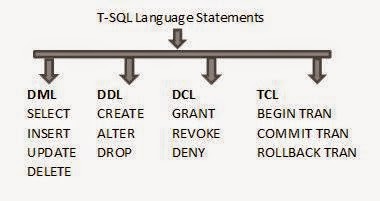
DML Statements:
DML stand for DATA MANIPULATION LANGUAGE. These statements used for querying insert, update, delete and retrieve data in the whole database system.
DML Statements:
Select: Use for retrieve data from table.
Insert: Use for insert new record/data.
Update: Use for update record/data.
Delete: Use for delete record/data or whole table.
DML Statements Implementation:
For the practice of DML first create table.
Create database hnhsol;
Use hnhsol
Create table tb1(id int ,name varchar(20))
insert into tb1 values(1,'salman')
insert into tb1 values(2,'zohaib')
insert into tb1 values(3,'arsalan')
insert into tb1 values(4,'asad')
insert into tb1 values(5,'waqar')

Select Statement:
select * from tb1
(Retrieve all data from a particular table)
select name from tb1
(Here retrieve single column data from a table)

Insert Statement:
insert into tb1 values(6,'ali')
(This statement is use for insert single of data in a table)

Update statement:
update tb1 set name=’naeem’ where id=1;
(This update statement is use for update a particular record in a table)
Note: here where is use for as a search condition or reference that’s why a particular single record change/update otherwise you don’t use this where clause the whole column data will be change, so be care full to use this statement.

Delete Statement:
delete from tb1 where id=2 and name='zohaib';
(This delete statement is use for delete a particular record in a table)

 copy and paste code step by step in sql management studio and see the magic.
 if you have any query related this post . write in comment box. 


T-SQL Statements DML, DDL, DCL,TCL with Example (Part #1).


DML Statements:
DML stand for DATA MANIPULATION LANGUAGE. These statements used for querying insert, update, delete and retrieve data in the whole database system.
DML Statements:
Select: Use for retrieve data from table.
Insert: Use for insert new record/data.
Update: Use for update record/data.
Delete: Use for delete record/data or whole table.
DML Statements Implementation:
For the practice of DML first create table.
Create database hnhsol;
Use hnhsol
Create table tb1(id int ,name varchar(20))
insert into tb1 values(1,'salman')
insert into tb1 values(2,'zohaib')
insert into tb1 values(3,'arsalan')
insert into tb1 values(4,'asad')
insert into tb1 values(5,'waqar')

Select Statement:
select * from tb1
(Retrieve all data from a particular table)
select name from tb1
(Here retrieve single column data from a table)

Insert Statement:
insert into tb1 values(6,'ali')
(This statement is use for insert single of data in a table)

Update statement:
update tb1 set name=’naeem’ where id=1;
(This update statement is use for update a particular record in a table)
Note: here where is use for as a search condition or reference that’s why a particular single record change/update otherwise you don’t use this where clause the whole column data will be change, so be care full to use this statement.

Delete Statement:
delete from tb1 where id=2 and name='zohaib';
(This delete statement is use for delete a particular record in a table)

 copy and paste code step by step in sql management studio and see the magic.
 if you have any query related this post . write in comment box. 


Posted at 10:05 AM |  by Unknown

Sunday, April 13, 2014

GSPM           
(General Software Process Model)

A framework that describe the activities performed at each stage of a software development project. This GSPM deal with all kinds of client requirements measure and unmeasured requirements. GSPM have three modes of working on any type of software. First if client and software   team don’t know or understand our software/product requirements so using mode1 in this mode analyses take continuous feedback of client            then done the requirements on software. Second if client sure about            our requirements of software / product and the product target is market business , so the team make a basic version of product and given to client then client get positive response from market then again say to team for next version so using of this mode loss criteria is less. Third in this mode both client and team confirm sure about our requirements, in this mode work only experts and use for large scale projects .so in this mode project head divide the project and make teams and all teams work in parallel. IN this process model seven phases and three modes of working in GSPM.


      GSPM Diagram         
GSPM Uniqueness:


Advantages:
1.      Useful for both beginners and expert’s teams.
2.      Apply on small and big projects.


Disadvantages:
1.      GSPM run in a linear way, don’t go back.
2.      One time planning.


 GSPM Example:


GSPM is a general software process model and they apply of almost all kind of market software many software example apply GSPM process model easily like.
  1. School management System.
  2. Shop inventory System.
  3. Software Product (i.e. MS Office).


Software Process Model (GSPM)

GSPM           
(General Software Process Model)

A framework that describe the activities performed at each stage of a software development project. This GSPM deal with all kinds of client requirements measure and unmeasured requirements. GSPM have three modes of working on any type of software. First if client and software   team don’t know or understand our software/product requirements so using mode1 in this mode analyses take continuous feedback of client            then done the requirements on software. Second if client sure about            our requirements of software / product and the product target is market business , so the team make a basic version of product and given to client then client get positive response from market then again say to team for next version so using of this mode loss criteria is less. Third in this mode both client and team confirm sure about our requirements, in this mode work only experts and use for large scale projects .so in this mode project head divide the project and make teams and all teams work in parallel. IN this process model seven phases and three modes of working in GSPM.


      GSPM Diagram         
GSPM Uniqueness:


Advantages:
1.      Useful for both beginners and expert’s teams.
2.      Apply on small and big projects.


Disadvantages:
1.      GSPM run in a linear way, don’t go back.
2.      One time planning.


 GSPM Example:


GSPM is a general software process model and they apply of almost all kind of market software many software example apply GSPM process model easily like.
  1. School management System.
  2. Shop inventory System.
  3. Software Product (i.e. MS Office).


Posted at 1:39 AM |  by Unknown

Tuesday, March 18, 2014


Microsoft release new MS Project Professional 2013 or MS Project 2013 Online with
allots of new features as compare with previous MS Project Professional 2010. MS Project Professional 2013 and SharePoint serve 2013 or MS SQL 2012 deliver best management
solutions and flexibility with all off major browsers Google, internet explorer, safari, Mozilla
Firefox and provide flexible easy integration with Lync server exchange server , SharePoint
Server. MS Project 2013 online is more valuable for project managers because it integrates
with office 365 an outlook. He can manage our plans related to projects easily, view projects reports ,views and much more.MS Project not a browser base desktop application it is fully
cloud based service offered by Microsoft .MS Project 2013 online also come with Office 365
and manage our projects plans anywhere in the world without any problems or dely.

See the new look of Project 2013.


Download anf configure MS Project 2013 step by step.
1.       Download MS Project 2013 Professional  OR Project 2013 Online
2.     Select the Edition 32bit or 64bit.
3.     And then simply follow the instructions just like installation of MS Office.    

      Enjoy MS Project 2013 ,if you face any prblem during MS Project Installation and
      Configuration , mention in comment box i will resolve your problem.

Microsoft Project Professional 2013 and Project Server 2013 Install and Configure .


Microsoft release new MS Project Professional 2013 or MS Project 2013 Online with
allots of new features as compare with previous MS Project Professional 2010. MS Project Professional 2013 and SharePoint serve 2013 or MS SQL 2012 deliver best management
solutions and flexibility with all off major browsers Google, internet explorer, safari, Mozilla
Firefox and provide flexible easy integration with Lync server exchange server , SharePoint
Server. MS Project 2013 online is more valuable for project managers because it integrates
with office 365 an outlook. He can manage our plans related to projects easily, view projects reports ,views and much more.MS Project not a browser base desktop application it is fully
cloud based service offered by Microsoft .MS Project 2013 online also come with Office 365
and manage our projects plans anywhere in the world without any problems or dely.

See the new look of Project 2013.


Download anf configure MS Project 2013 step by step.
1.       Download MS Project 2013 Professional  OR Project 2013 Online
2.     Select the Edition 32bit or 64bit.
3.     And then simply follow the instructions just like installation of MS Office.    

      Enjoy MS Project 2013 ,if you face any prblem during MS Project Installation and
      Configuration , mention in comment box i will resolve your problem.

Posted at 1:41 PM |  by Unknown

Saturday, March 15, 2014


White box testing, structural box, transparent box, gray box, crystal box are same .In white box testing tester perform analysis of code / structure / design etc. of software/application. But the actual desired results come from requirements. And expected results come in one condition tester knows what software working do its only know that by doing first black box testing, then come more appropriate results. IN white box testing use a specific programing language to examine the test cases outputs.

White Box Testing Levels:

1: Unit Testing.
2: Integration Testing.
3: System Testing
4: Regression Testing.
5: Acceptance Testing


In white box testing each line of program code execute atleast in time .


 SomeWhite box testing  complex techniques.


White Box Testing


White box testing, structural box, transparent box, gray box, crystal box are same .In white box testing tester perform analysis of code / structure / design etc. of software/application. But the actual desired results come from requirements. And expected results come in one condition tester knows what software working do its only know that by doing first black box testing, then come more appropriate results. IN white box testing use a specific programing language to examine the test cases outputs.

White Box Testing Levels:

1: Unit Testing.
2: Integration Testing.
3: System Testing
4: Regression Testing.
5: Acceptance Testing


In white box testing each line of program code execute atleast in time .


 SomeWhite box testing  complex techniques.


Posted at 11:57 PM |  by Unknown

Wednesday, March 12, 2014

A database is a collection of related records, information and files about a particular subject .And organized all the data in one place.
Basic database key terms are:
1   1.   File
2   2.  Record
3   3.   Field


Some popular databases and its venders are:

ORACLE:
Oracle
My SQL
No SQL

MICROSOFT:
MS SQL
MS Access

IBM:
DB2

SAP:
Sybase


What is DATABASE?

A database is a collection of related records, information and files about a particular subject .And organized all the data in one place.
Basic database key terms are:
1   1.   File
2   2.  Record
3   3.   Field


Some popular databases and its venders are:

ORACLE:
Oracle
My SQL
No SQL

MICROSOFT:
MS SQL
MS Access

IBM:
DB2

SAP:
Sybase


Posted at 4:04 AM |  by Unknown

See me on Linkedin

© 2013 HnH Sol. WP Theme-junkie converted by BloggerTheme9
back to top